Get in touch
White label perpetual futures exchange

Your own leveraged futures exchange under your brand

A ready hybrid exchange. Orders are matched on servers with no gas to pay, while balances and trades are anchored on Arbitrum One, so every trader can check them. We launch the exchange under your name, set it up and support it

  • Leverage up to 100x
  • USDT and USDC on Arbitrum One
  • Sign in with a crypto wallet
  • Balances provable on chain
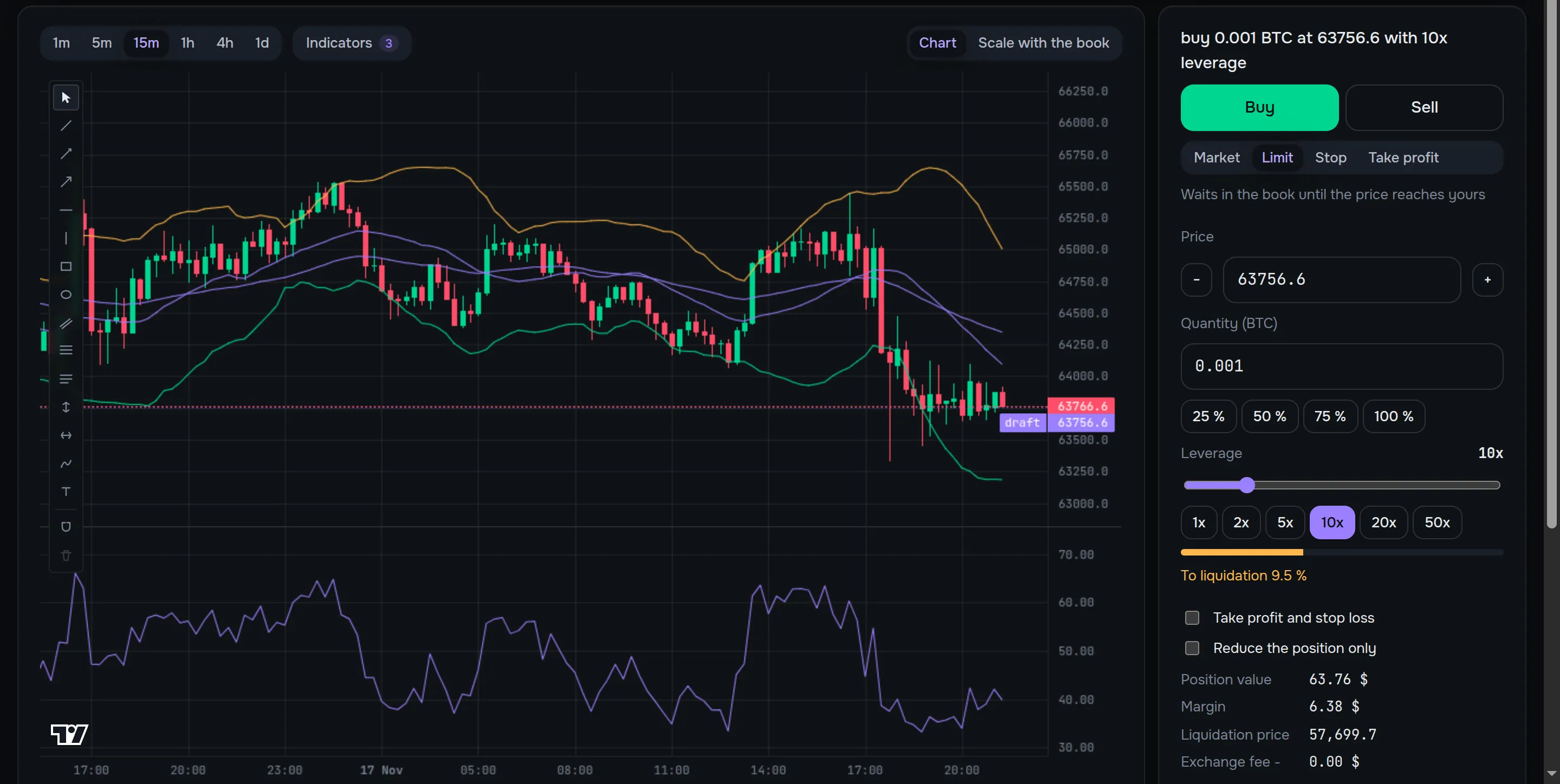
The trading terminal of the demo exchange: index candles, Bollinger Bands, EMA, RSI and the order form The trading terminal of the demo exchange: index candles, Bollinger Bands, EMA, RSI and the order form
Index pricemedian of five exchanges
Signed receiptfor every trade and balance change
Proof on chainthe root in the RootRegistry contract

Screenshot of the demo stand on a test network

100x maximum leverage on a market
5 exchanges in the price index, at least 3 required
98 chart indicators and 14 drawing tools
4 order types, take profit and stop loss on a position
7 site languages and 3 colour themes
5 staff roles with separate permissions
What you get

A whole exchange, not a kit of parts

Every part runs and is shown on the demo stand. You get a product that launches once it is set up for your brand, not a starting point for development

Website and trading terminal

Exchange home page, markets, a terminal with the order book and order form, portfolio, wallet with deposits and withdrawals, proofs, support and fees. Seven languages and three colour themes. Markets and the terminal open without signing in

Operator admin panel

Users, treasury, support tickets, markets, price sources, risk, fees, proofs, audit log, team and settings. In production staff sign in only with two-factor protection

Matching engine in Rust

A separate process matches orders, keeps positions, balances, funding and liquidations, and signs a receipt for every action

Blockchain and proofs

The RootRegistry contract on Arbitrum One keeps the roots of proof batches. Deposits and withdrawals in USDT and USDC, sweeping of deposit addresses, hot and cold wallets

API and events

HTTP API for the website, the admin panel and trading bots, API keys with a separate trading permission, real-time events over sockets

Why hybrid

The speed of a regular exchange, the provability of a blockchain

Kvikex takes gasless trading from centralised exchanges and provable balances from the blockchain

Kvikex Fully on-chain exchange Regular centralised exchange
Placing and cancelling no gas gas for every action no gas
Matching engine on a server waits for a block engine on a server
Checking balances proof root on chain, traders check their own entry in the browser state is open on chain usually not possible
Where funds are on exchange addresses, the list and balances are public in a smart contract on exchange addresses
Sign in crypto wallet, no password or email crypto wallet email and password
Price for liquidations median of five exchanges, outliers dropped network oracle exchange index
How it works

A trader's path from sign-in to withdrawal

  1. 01

    Sign in with a wallet

    The trader connects MetaMask, Rabby or another wallet and signs a message. Signing sends no transaction and needs no gas, the account opens on the first sign-in

  2. 02

    Deposit

    USDT or USDC go to a personal deposit address on Arbitrum One and are credited after network confirmations. From other networks through the built-in Bungee bridge

  3. 03

    Trade

    Orders reach the matching engine without a wallet signature and without gas. For every trade and balance change the trader gets a receipt signed by the exchange

  4. 04

    Proof and withdrawal

    The exchange folds balances and receipts into a Merkle tree and publishes its root in the contract. The trader checks their entry and withdraws funds

Product in video

See Kvikex at work

Ten short videos follow one trader and the staff of the exchange on the demo stand: sign-in, deposit, trade, withdrawal, proofs and the admin panel.

Trader

Markets without an account

A visitor studies the markets, the BTC terminal, the public proofs and the fees before connecting a wallet. Trading opens after a wallet sign-in.

Details
Trader

Sign in with a wallet

A trader signs in with a crypto wallet, one signature without gas, and the faucet tops the wallet up to 1,000 test USDT with ETH for gas.

Details
Trader

Deposit from the wallet

A trader deposits 1,000 test USDT from the connected wallet with one token transfer. After 20 network confirmations the exchange credits 1,000 KVUSD one to one.

Details
Trader

A trade with leverage

A trader buys 0.05 BTC with 10x leverage, sets take profit and stop loss, lowers the leverage to 5x and closes the position with signed receipts.

Details
Trader

Withdrawal with a wallet signature

A trader withdraws 300 USDT to the sign-in wallet and confirms it with a wallet signature, no code and no gas. 299 USDT arrive after the network fee.

Details
Trader

Proof of balances

A trader checks in the browser that the balance is in the check published on chain, and verifies the signed withdrawal receipt against the contract.

Details
Operator

The admin panel

A risk manager reviews the dashboard and the markets in the admin panel and lowers the BTC leverage cap from 50x to 20x. The site follows at once.

Details
Operator

Treasury and a large withdrawal

A 600 USDT withdrawal above the threshold waits for two staff members: the treasurer and the super admin approve it, and the hot wallet pays out 599 USDT.

Details
Operator

Risk and the liquidity bot

A risk manager reviews positions near liquidation, the exchange as counterparty and the insurance fund, and the demo order book gets deeper.

Details
Operator

A lead and the brand

A buyer leaves a request on the product site, the lead is marked contacted, and the account token gets the operator's name on the exchange site.

Details

Narration in English, subtitles in your language. Recorded on the demo stand with test funds.

All videos
For traders

A terminal that shows everything before the order is sent

Price, leverage, margin and liquidation use the same formulas as the matching engine and are drawn on the price scale

The trading terminal of the demo exchange: index candles, Bollinger Bands, EMA, RSI and the order form The trading terminal of the demo exchange: index candles, Bollinger Bands, EMA, RSI and the order form

A professional chart

Candles of the index price, 98 indicators and 14 drawing tools on TradingView Lightweight Charts. The set of indicators and the drawings of every market stay in the browser

Four order types

Market, limit, stop and take profit. Take profit and stop loss on a position, reduce-only orders

Order draft on the scale

While the trader types price and leverage, the scale shows entry, take profit, stop loss and the liquidation price

Index of five exchanges

Margin and liquidations follow the median of Binance, OKX, Bybit, Coinbase and Kraken. A source that drifts away is dropped

Sign in with a wallet

MetaMask, Rabby and other browser wallets, phone wallets through WalletConnect. No email and no password

The order book on the price scale

A second view of the terminal puts the order book on the same price scale as the candles. A click on a level puts the price into the form

API keys

Trading bots work through the API with their own keys, and the trading permission is granted to a key explicitly

Withdrawal protection

A wallet signature on every withdrawal, an address book with a delay for new addresses, screening of new addresses and manual review of large amounts

Bridge from other networks

Deposits from other networks through Bungee right on the wallet page

Seven languages, three themes

Ukrainian, English, Russian, Japanese, French, German and Spanish. Two light themes and a dark one

Provability

Honesty that traders check themselves

Every proof is published on chain, and every trader can verify their own balance without taking the operator's word for it

rootyour balance
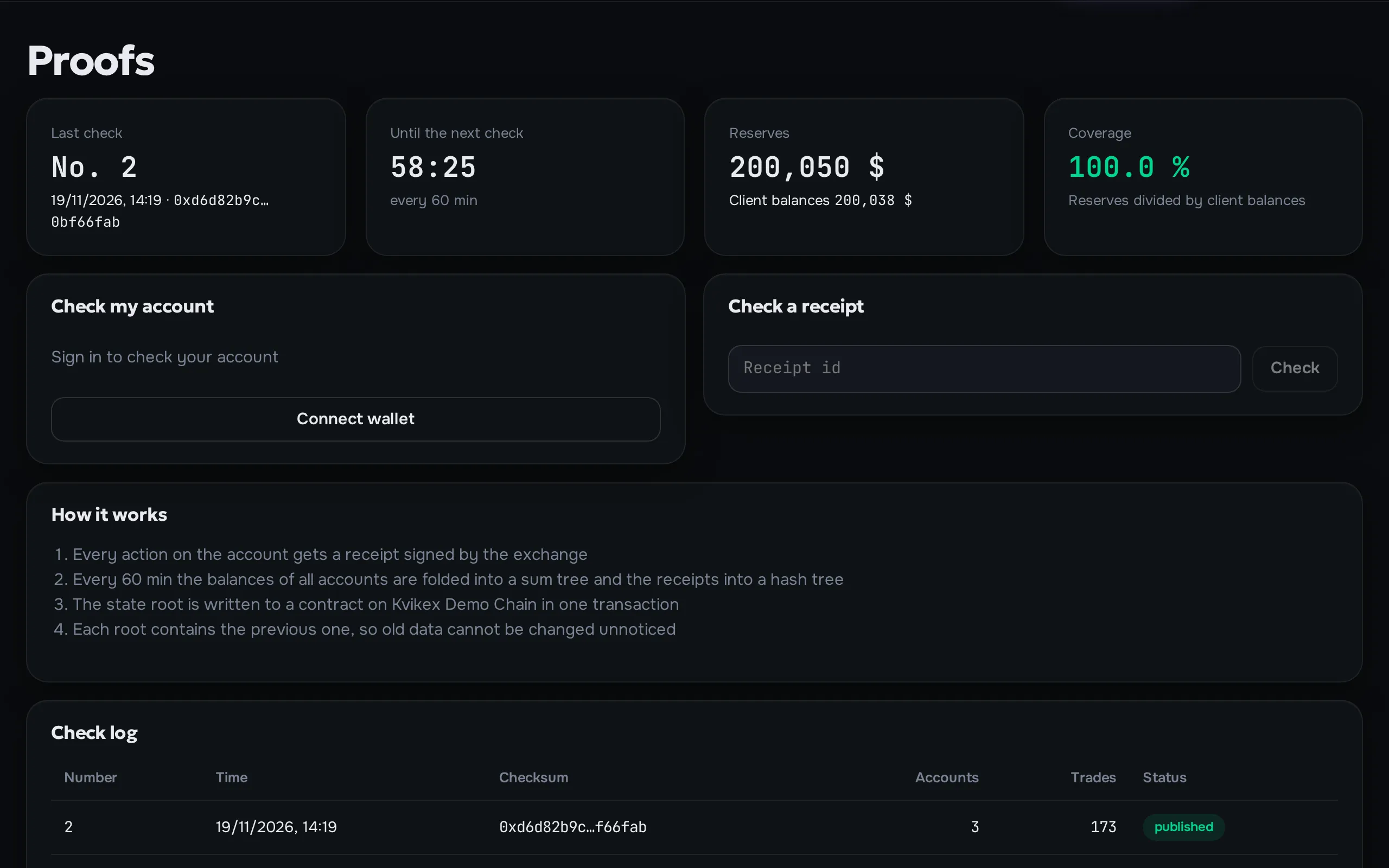
The proofs page of the demo exchange: the latest check, reserves, coverage and the check log The proofs page of the demo exchange: the latest check, reserves, coverage and the check log

Proof root on chain

Balances and receipts are folded into one checksum. One transaction per batch, however many trades there were

Your own entry in the tree

The trader gets the path from their entry to the root and checks in the browser that their balance is in the published batch

Public reserves

Exchange addresses and their balances are shown on the site, and reserve coverage is computed in the open

A signature on every action

Only the matching engine holds the receipt signing key. A receipt cannot be replaced without that key

For operators

An admin panel that runs the exchange without developers

The team's daily work happens in the admin panel: money, risk, markets, support and settings change without a new release

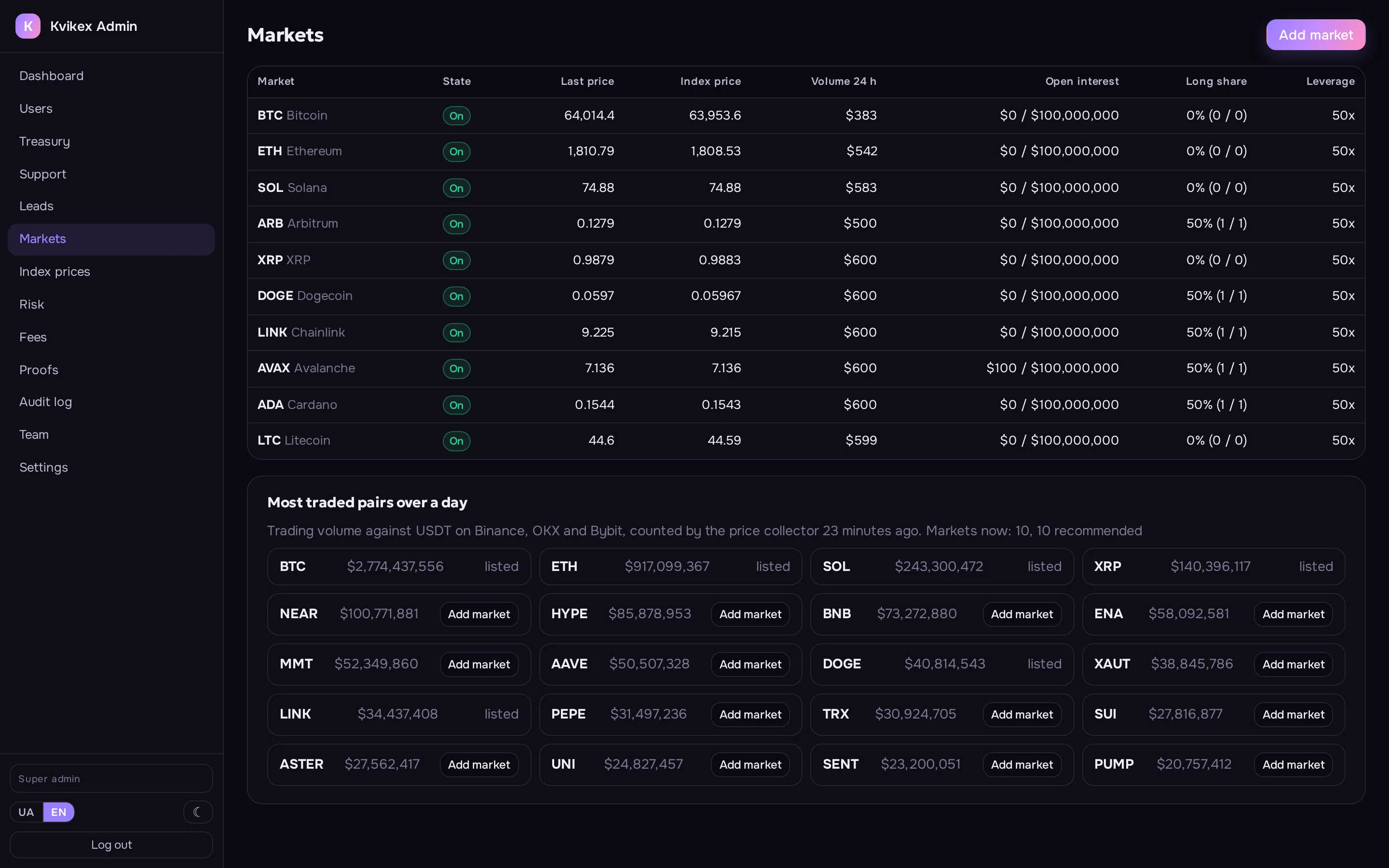
The markets section of the demo admin panel: ten markets with index prices and the most traded pairs of the day The markets section of the demo admin panel: ten markets with index prices and the most traded pairs of the day

Roles and permissions

Super admin, risk, treasury, support and audit. Every staff action goes to the audit log

Treasury

Withdrawal queue, thresholds for manual and double approval, hot and cold wallet balances and transfers between them

Risk and liquidations

Positions near liquidation, warnings to traders, the insurance fund and its deferred debts

Markets and prices

Market parameters, maximum leverage, index sources and switching a source off when it fails

Fees

Maker and taker, tiers by 30-day volume, individual terms for a single account

Support

Trader tickets with reply deadlines and ready-made answer templates

Proofs and reserves

History of published proof batches, their cost on the network and reserve coverage of balances

Settings on the fly

Stop trading, maintenance mode, pausing deposits and withdrawals, sign-up of new accounts without a restart

Security

Funds are protected by procedure, not by promises

Cold wallet off the server

Key holders move funds out of the cold wallet outside the system, and its keys never touch the server

Two-factor for staff

In production staff cannot enter the admin panel without an authenticator code, and this rule cannot be switched off there. Only the demo stand lets staff in with a password alone

Withdrawal rules

Thresholds for manual review and double approval, a delay for new addresses, address screening by an external service

Only the engine changes balances

Only the matching engine changes balances, positions and trades, the other parts only read them

Technology

A proven stack, nothing exotic

Each part does one job and talks to the others only through the API, sockets, a Redis stream and the database schema

Exact money

Amounts are decimal numbers in the engine, the database and the API, never floating point

A queue in front of the engine

The API passes commands to the Rust engine through a Redis stream, the engine publishes events back and sockets deliver them to browsers

Its own price index

A separate collector keeps connections to five exchanges, computes the median twice a second and stores index candles for the chart

Separate parts

Website, admin panel, API, matching engine and this landing page are separate projects that can live in separate repositories

Rust matching engine
Python and Litestar API and background jobs
PostgreSQL exchange data
Redis engine command queue and cache
RabbitMQ background jobs
SvelteKit website and admin panel
Solidity proof contract
Arbitrum One network for deposits, withdrawals and proofs
Docker deployment
Launch

How the launch goes

From the first demo to a running exchange: we set it up, deploy it on your servers and stay with you after the launch

01

Demo

We show the demo exchange and the admin panel and go through your model: markets, fees, countries

02

Branding

Name, logo, colours, domains, site texts, the set of markets and fees

03

Deployment

We install the system on your servers in Docker, connect Arbitrum One, wallets and keys, and check the full cycle of deposit, trading and withdrawal

04

Go-live and support

We stay with you through the launch, ship updates and answer your team under a support contract

What is set up for you

  • Name, logo and favicon
  • Colours of the three themes
  • Domains of the site, the API and the admin panel
  • Site texts in seven languages
  • Markets and their leverage limits
  • Fees and volume tiers
  • Index sources for every market
  • Withdrawal rules and approval thresholds
FAQ

Frequently asked questions

No, it is a hybrid exchange. Trading runs on the operator's servers, and the blockchain is used for deposits, withdrawals and publishing proofs. Funds are held on exchange addresses, their list and balances are public, and every trader can check their balance in a published proof batch

Arbitrum One. Deposits and withdrawals are in USDT and USDC on this network, funds from other networks arrive through the built-in Bungee bridge

The order book first: traders' limit orders are matched with each other. When the book has no better price, the exchange itself takes the other side at the index price with the spread set per market in the admin panel. The spread widens as the exchange's open risk on the market grows, and above the set limit the exchange stops taking trades that add to it. Client losses are the operator's income, client wins are paid from it, and the result shows in the public reserve coverage. API keys are there for trading bots

Yes. Name, logo, colours, domains and texts are set up for your brand during the launch

On your servers. The parts ship as Docker containers and need PostgreSQL, Redis, RabbitMQ and S3-compatible file storage next to them

Requirements depend on the country and the business model. The operator handles the legal side with their own lawyers, we are responsible for the technical part

Open the demo exchange. It runs on a test blockchain, and the faucet on the wallet page gives out test coins. We show the admin panel at a meeting. On the demo, a liquidity bot fills the order book and the trade feed

The exchange regularly folds account balances and trade receipts into a Merkle tree and publishes its root in a contract. A published batch cannot be changed after the fact, and a trader checks that their balance is in it

See the exchange in action

Open the demo stand on a test network or leave a request, and we will show the admin panel and answer your questions

Contact

Let's discuss your exchange launch

Leave your contacts and we will offer a time to demo the exchange and the admin panel

Or try the demo exchange yourself